


Setting your first cue points
Cue points are one of the core tools every DJ relies on. They mark important moments in a track so you can jump to them instantly. Cue points make it easier to start mixes cleanly, practise transitions, and jump to key sections like drops, vocals, or breakdowns.
Why cue points are important
- They help you line up mixes consistently.
- You can return to the same moment in a track every time.
- They make learning DJ timing and transitions easier.
- They’re used by DJs at every skill level.
How to set a cue point
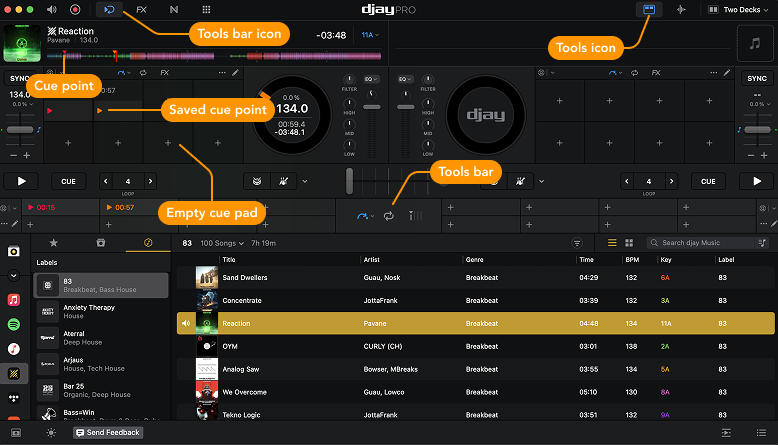
- Play or scroll through the track to find the moment you want to set the cue point.
- Open the Tools Bar or Tools.
- Click an empty cue pad to save the cue point.
- The cue will now appear on the waveform and in your cue pads.
You can set up to 16 cue points, each giving you instant access to a chosen moment in the track. Set them during a mix or prepare them in advance—they’ll stay saved in your collection.
note
If both Tools and the Tools Bar are open, your saved cue points will appear in each view.
To learn more about cue points, cue loops, pitch cue, quantization, and more, go to the Cue points section.