


Mixer overview
The mixer is where you shape your sound and control your mix. Use it to adjust channel volume, gain, EQs, filters, the crossfader, and more. This overview explains what each feature does and how it affects your mix.
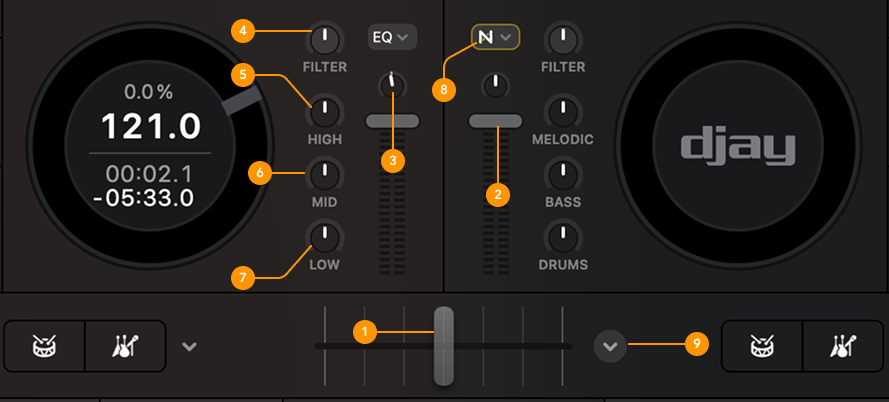
-
Crossfader: Blends the audio between the left and right decks.
-
Volume fader: Adjusts the output volume of each deck.
-
Gain: Controls the audio level going into each deck. Since tracks are produced at different levels, use the gain knob to balance the volume across your mix.
-
Filter: The filter knob lets you apply sweeping effects to shape your sound. Use it to build tension, smooth transitions, or create dramatic breakdowns. You can adjust the filter’s resonance characteristics under Settings > Sound.
-
High EQ: Affects high-frequency sounds like hi-hats, cymbals, and percussive elements. Boosting the highs adds brightness; cutting them can reduce harshness.
-
Mid EQ: Controls mid-range frequencies like guitars, synths, keys, and vocals. Use the mid EQ to make certain elements stand out or to create space in your mix.
-
Low EQ: Adjusts the low frequencies, typically bass and kick drums. Turn it up to boost the bass, or turn it down to reduce it.
-
EQ and Neural Mix™ dropdown menu: Use this dropdown to switch between classic EQ and Neural Mix™ modes. When Neural Mix™ is selected, the EQ knobs change control:
- Low = Drums
- Mid = Bass
- High = Melodic
Neural Mix™ lets you isolate or remove specific elements from any track, giving you powerful new creative options. Learn more in the Neural Mix™ section.
-
Crossfader FX: The Crossfader FX menu lets you add creative effects to your transitions. Choose from a wide range of effects that bring movement and individuality to your mix.
Learn more in the Crossfader FX section.
The mixer layout may vary depending on your deck view, but all controls work the same way.