


Track match
Match helps you stay in the flow by suggesting tracks that work well with the one currently playing. Instead of digging through your library, you’ll see intelligent recommendations based on key and tempo, so you can keep your transitions smooth and your mix moving. You can also add custom tracks to the Match playlist to guide the suggestions.
Match helps you find similar tracks across your library and connected streaming services.
How to match tracks
- Choose a library.
- Select and play a track.
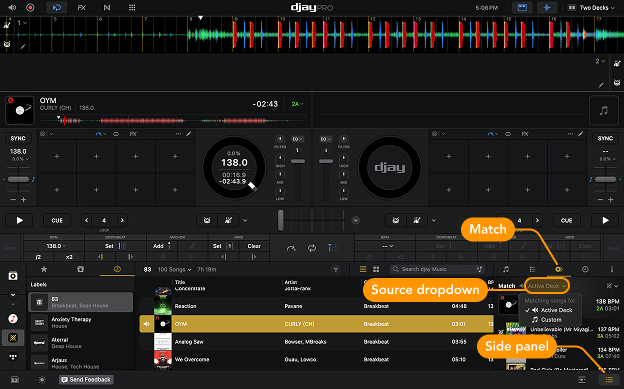
- Open the Side panel.
- Click the Match tab to get suggestions.
- Use the Source dropdown menu to choose whether Match uses the currently playing track or a custom track from the Match playlist.
tip
Match is a starting point, not a rulebook. Trust your ears and experiment—that’s where you’ll discover your own style.