


Using the crossfader
The crossfader is the DJ’s main tool for blending between decks. It lets you move smoothly from one track to another or layer both together for seamless transitions.
Move the crossfader left to play the left deck, right for the right deck, or center the crossfader to mix both.
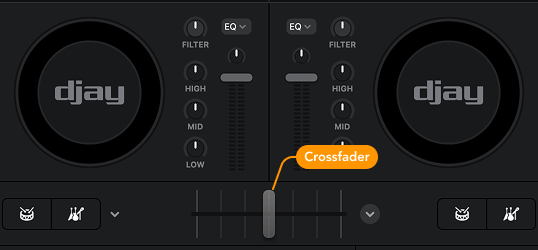
When using the 4-deck view, you can choose how you want to route the crossfader for each deck by clicking the dropdown menu.
Crossfader routing is essential when mixing with four decks, as it determines which decks are affected by your transitions. This gives you precise control over which tracks fade in or out, while other elements—such as loops, vocals, or samples—can keep playing independently. It’s the key to keeping complex multi-deck mixes clean and balanced.
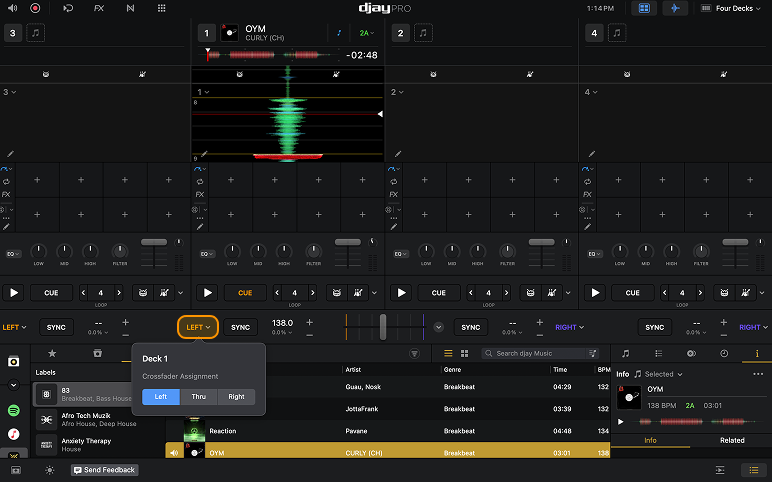
Deck routing options
- Left (crossfader channel)
- Thru (deck ignores the crossfader)
- Right (crossfader channel)
If you're using three or more decks, consider setting the crossfader to Thru and use the channel volume faders instead—unless you're doing crossfader tricks or cuts.