


Loading a track
Before you can start mixing, you’ll need to load music onto a deck. djay makes this quick and flexible, giving you several simple ways to get a track ready to play. Loading a track is the first step to getting the music flowing.
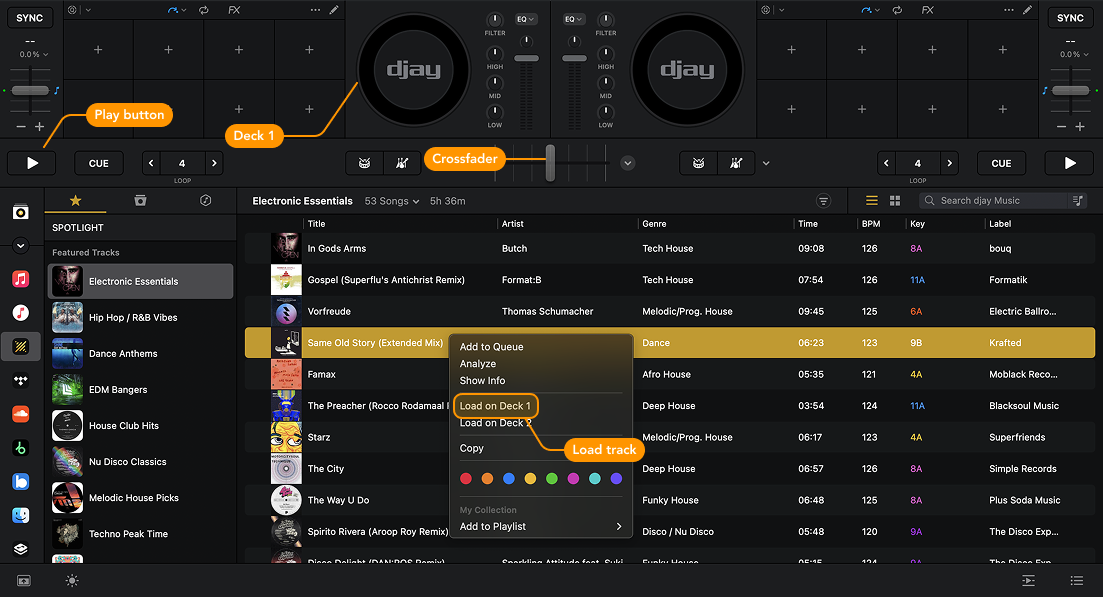
How to load a track onto a deck
- Right-click on a track and select Load on Deck 1.
- Drag and drop the track directly into Deck 1.
- Double-click a song to load it onto the next available deck.
The chosen track will begin playing automatically when it is loaded. To stop tracks playing automatically, go to Settings > General and turn off Start Playback.
note
Make sure the crossfader is set to the left (toward Deck 1) so you can hear the track.
How to access additional track options
Click the artwork next to the waveform of your loaded track.
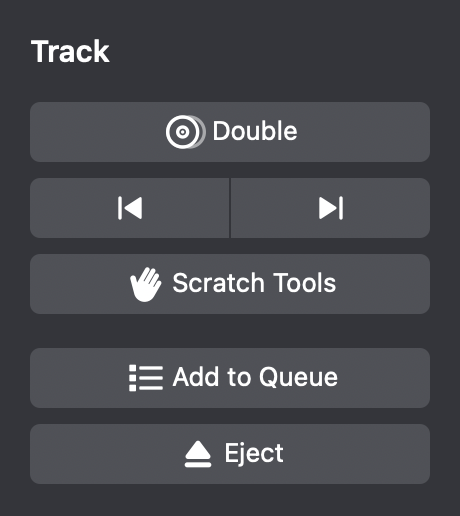
- Double: Loads the same track on both decks. Perfect for experimenting with transitions, beat juggling, or learning a song’s structure.
- Load next/load previous: Quickly switch to the next or previous track.
- Scratch tools: Instantly loads a scratch-ready track from djay’s built-in scratch tools.
- Add to queue: Adds the track to your queue.
- Eject: Unloads the track from the deck.