


Automix overview
Automix is a powerful tool for creating seamless mixes automatically. It’s perfect for background music at events, taking a break during a set, or exploring new song combinations. Powered by AI, Automix analyzes tracks and selects smooth transition points—making it useful for both beginners and seasoned DJs.
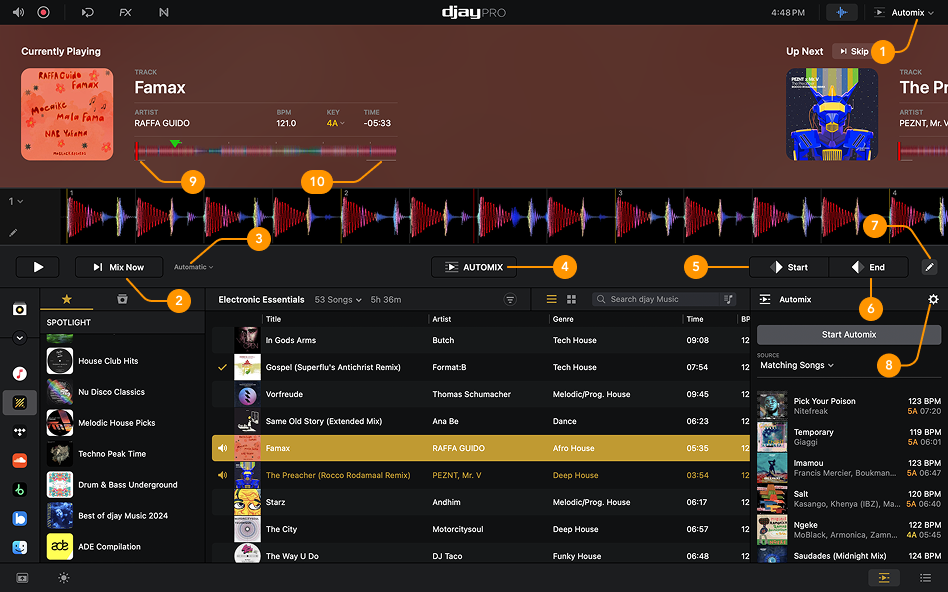
-
Automix view: Open Automix from the View modes dropdown menu.
-
Mix now: Transition instantly to the next track.
-
Mix options: Choose effects for transitions, set blend duration, and decide how to adjust tempo.
-
Start Automix: Toggle Automix on or off.
-
Transition start point: Manually set where the transition should begin.
-
Transition end point: Manually set where the transition should end.
-
Edit transition start and end points: Click the pencil icon to adjust both the start and end points of a transition.
-
Automix settings: Open additional Automix settings for more customization.
-
Automix entry region: The white line at the beginning of the waveform shows where the track will start mixing in when Automix is on.
-
Automix exit region: The white line at the end of the waveform shows where the track will start mixing out when Automix is on.