


Crossfader FX
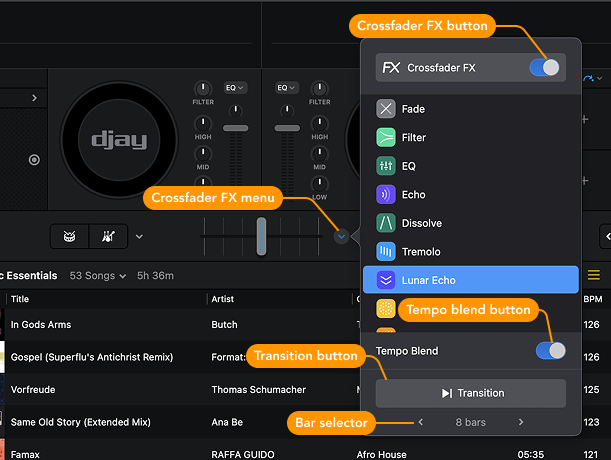
Crossfader FX adds effects to your transitions—going beyond a basic left-to-right volume fade. Use Echos, Filters, Tremolos, Sweeps, Risers, and Neural Mix™ to create smooth, cinematic fades or wild, creative blends. You can also control the duration of the transition by selecting the number of bars.
Crossfader FX is perfect for adding flavor to transitions automatically, without worrying about precise EQ or volume control.
Looking for an easy way to match tracks with different BPMs? Try Tempo Blend. Just load tracks with different tempos onto each deck, and Tempo Blend will automatically sync them as you move the crossfader. It’s a great way to switch up genres and tempos while keeping the energy going.
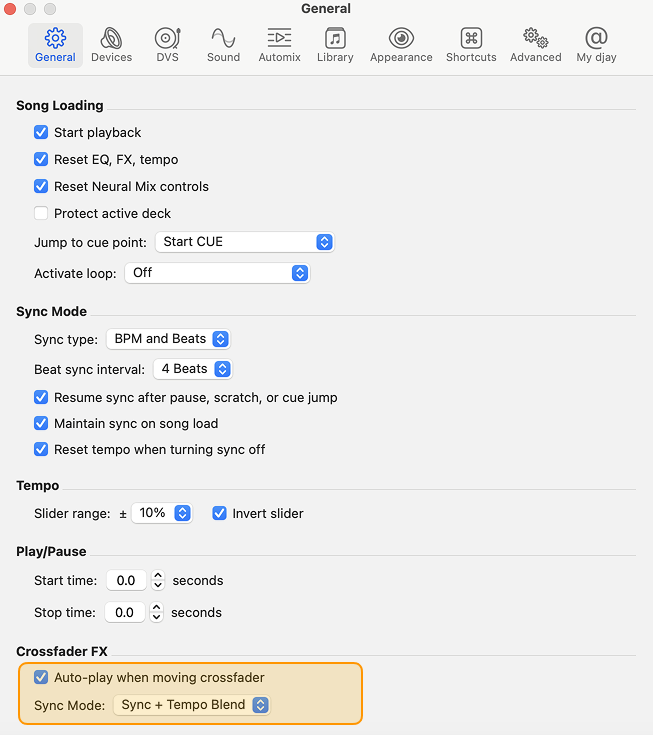
When Crossfader FX is enabled, it can override your selected Sync mode and change how the crossfader behaves. If Sync isn’t working as expected, check Settings > General > Crossfader FX to review your configuration.
If you're practicing manual beatmatching, consider turning Crossfader FX Sync Mode off to avoid unexpected tempo changes.
Want more precise control? Use Neural Mix™ to separate and blend stems (such as drums, vocals, and harmonies) in real-time. With Neural Mix™, you can isolate and manipulate parts of a track on the fly—perfect for creative transitions, mashups, or minimalist edits.
Neural Mix™ lets you apply effects to individual stems within a track. For example, you can add echo only to the drums, or add sustain to just the vocals—without affecting the rest of the mix.
How to use Crossfader FX
- Load your tracks onto the decks.
- Click the dropdown icon next to the crossfader to open Crossfader FX.
- Toggle the Crossfader FX button to enable it.
- Choose the effect(s) you want to use.
- Select the number of bars for the transition length.
- With both tracks playing, either move the crossfader or click the Transition button.
djay will now blend the tracks and effects, creating smooth and dynamic transitions that are uniquely yours.
You can quickly tell when Crossfader FX is active by looking at the crossfader—a blue line will appear down the center when it’s turned on.