


Metadata
Metadata refers to the information embedded in a digital audio file, such as artist, track title, album, genre, and more. Metadata is essential for organizing, finding, and mixing your music efficiently.
Customizing metadata columns
- Right-click the metadata bar at the top of the playlist window.
- Tick or untick the columns you'd like to show or hide.
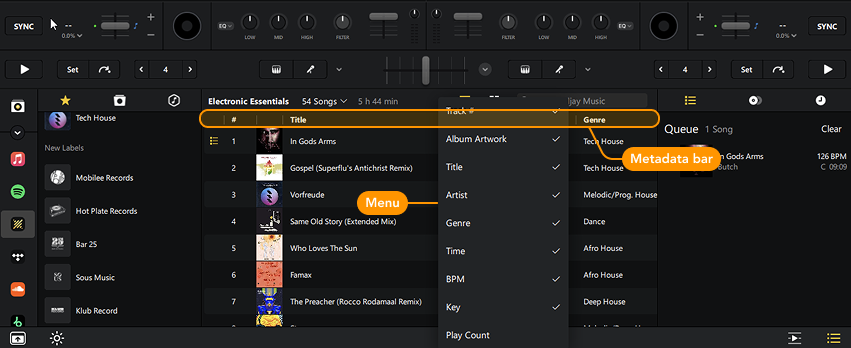
Metadata columns help sort your music quickly and easily. Click on the column you wish to sort by to switch between ascending and descending order.
A third click will switch back to the default play order. For example, sorting by Artist arranges tracks alphabetically. Sorting by BPM lets you view tracks from slowest to fastest—or the other way around.
Metadata columns can change depending on the source of your music. For example, TIDAL, Beatport/Beatsource, and SoundCloud will have different metadata available.
Editing metadata
If you need to edit your track metadata, you will need to use iTunes, Windows Media Player, or another music management application.