Midi devices
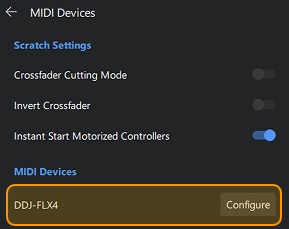
The MIDI Devices settings let you manage your connected controllers and adjust how their controls behave in djay. Use these options to fine-tune features like scratch response, crossfader behavior, and other performance-sensitive controls.

Scratch settings
- Crossfader cutting mode: Makes the crossfader extremely responsive, allowing audio to cut in and out instantly—ideal for scratching and fast performance techniques.
- Invert crossfader: Reverses the crossfader’s left–right direction, so each side controls the opposite deck.
- Instant start motorized controllers: Starts playback the moment you press play on a motorized controller, bypassing the platter’s spin-up time for tighter cueing and scratch responsiveness.
Midi devices
Custom MIDI mappings let you tailor how your controller interacts with djay by assigning your preferred actions to each button, knob, and pad. This helps you create a control layout that feels natural to the way you mix.
To edit your controller's controls, click the configure button next to the contoller's name.
To learn more about configuring MIDI controllers, go the the MIDI mapping section.