


Library settings
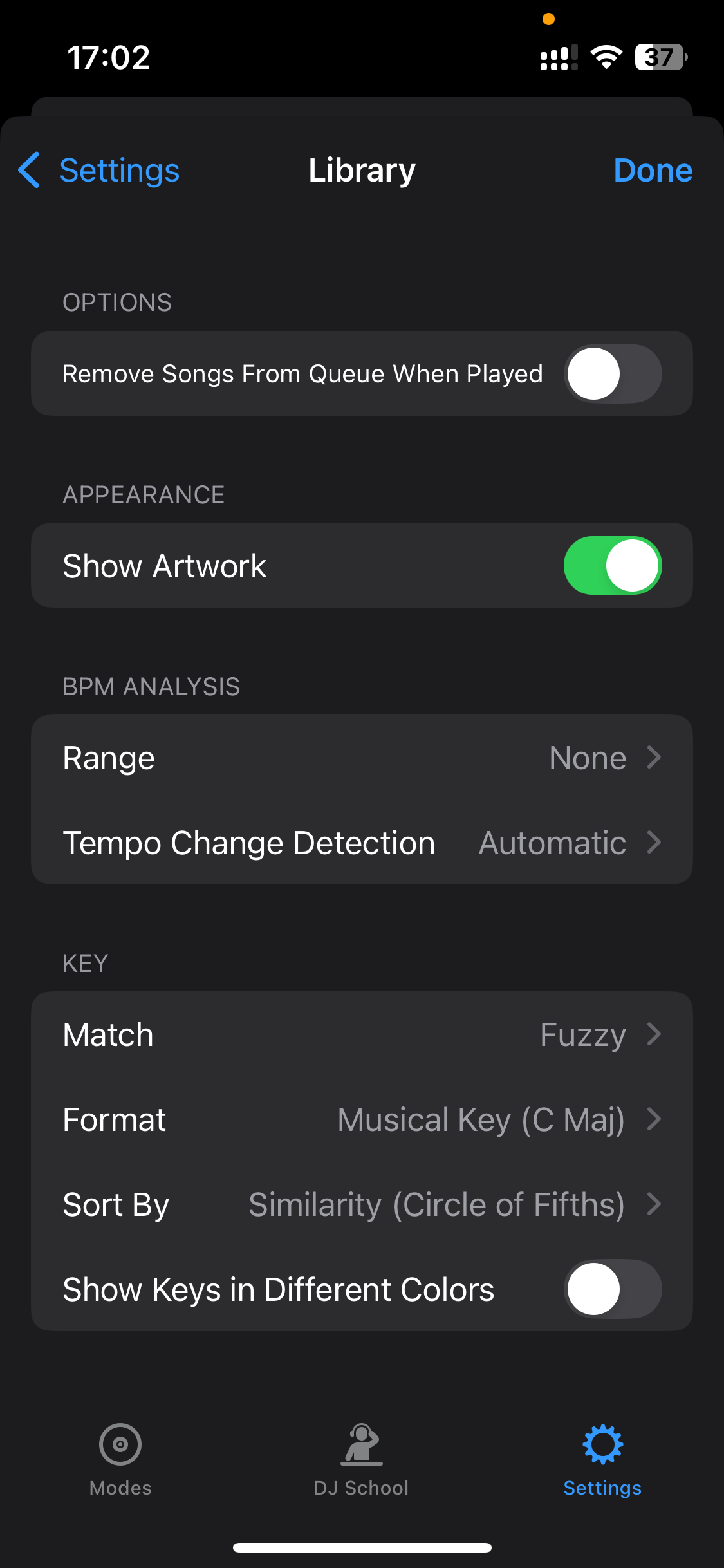
Customize how djay handles your music library, from queue behavior, BPM analysis, and key detection. These settings help keep your collection organized and your mixing workflow smooth.
Options
- Remove songs from Queue when played: Tick this box if you don’t want to see tracks that have already been played in the Queue.
Appearance
- Show artwork: toggles track artwork visibility in the Library, helping you identify songs visually while browsing.
BPM Analysis
-
Range: Sets the expected BPM range for tempo analysis. Helps djay avoid detecting tracks at half or double speed.
-
Tempo Change Detection: Enable this to let djay track tempo fluctuations within a song.
Key
-
Match: Choose between Exact key matching or Fuzzy, which suggests harmonically related keys using the circle of fifths.
-
Format: Choose how keys are displayed: Musical Key, Musical Key with Major/Minor, Numerical Key, or OpenKey.
-
Sort by: Choose how your tracks are sorted when browsing by key—Similarity (based on the circle of fifths) or Pitch distance (chromatically).
-
Show keys in different colors: Color-codes the key labels, making it easy to spot tracks that will mix harmonically.