Automix overview
Automix creates seamless mixes automatically, making it ideal for background music, taking a break during a set, or exploring new song combinations. Powered by AI, it analyzes tracks and selects smooth transition points for consistent, professional-sounding results.
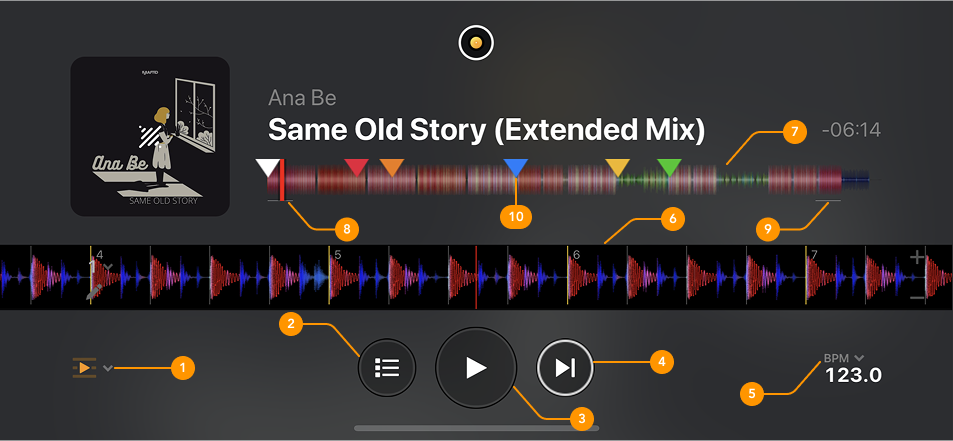
-
Mix options: Choose effects for transitions, set blend duration, and adjust tempo.
-
Automix playlist: Add and remove tracks from the Automix playlist
-
Play button: Start or pause Automix playback.
-
Next track: Tap to mix into the next track in the playlist.
-
BPM: Tap to adjust the tempo of the track playing.
-
Scrolling waveform: Displays a zoomed-in, real-time view of the track.
-
Waveform overview: The visual representation of the track's audio
-
Automix entry region: The white line at the beginning of the waveform shows where the track will start mixing in when Automix is on.
-
Automix exit region: The white line at the end of the waveform shows where the track will start mixing out when Automix is on.
-
Cue point: Colored markers showing a track’s saved cue points.
The Automix interface may appear differently depending on whether your device is in portrait or landscape orientation.
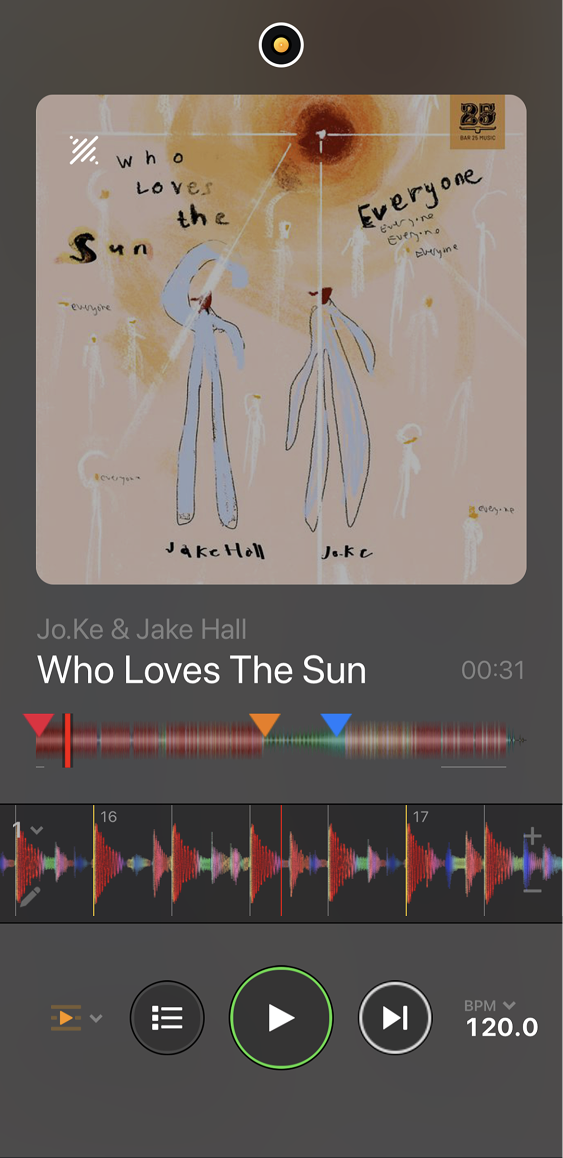
Portrait view
When your device is vertical, Automix shifts to a player-style view that prioritizes track artwork, playback controls, and track info—great for casual listening, house parties, or keeping the music flowing in the background without needing the full DJ layout.