


Why is there no audio from my controller when it's connected over Bluetooth?
This article explains why a DJ controller connected to djay over Bluetooth won't play sound through its main or headphone outputs.
Understanding Bluetooth MIDI vs. Bluetooth Audio
When you pair a DJ controller with djay wirelessly, you're using Bluetooth MIDI, not Bluetooth audio. Bluetooth MIDI carries button presses, knob turns, and jog wheel movements to djay, while Bluetooth audio is the separate technology that wireless headphones and speakers use to carry sound. DJ controllers only support Bluetooth MIDI.
How to get audio from your controller
If you want to connect your speakers and headphones to your controller, you can do so by connecting to your device via USB cable:
-
Connect your controller to your device with an Apple Lightning to USB 3 Camera Adapter (for Lightning devices) or an Apple USB-C Digital AV Multiport Adapter (for USB-C devices).
-
Plug your headphones into the controller's headphone output to use it for pre-cueing. Connect your speakers to the controller's main outputs.
-
Open djay. If you connect a natively supported (plug-and-play) DJ controller djay will automatically configure your audio settings and no manual audio setup is required.
If your controller is not natively supported, under Settings > Devices, choose your controller under Main Output with ch 1-2 and Pre-Cueing with ch 3-4.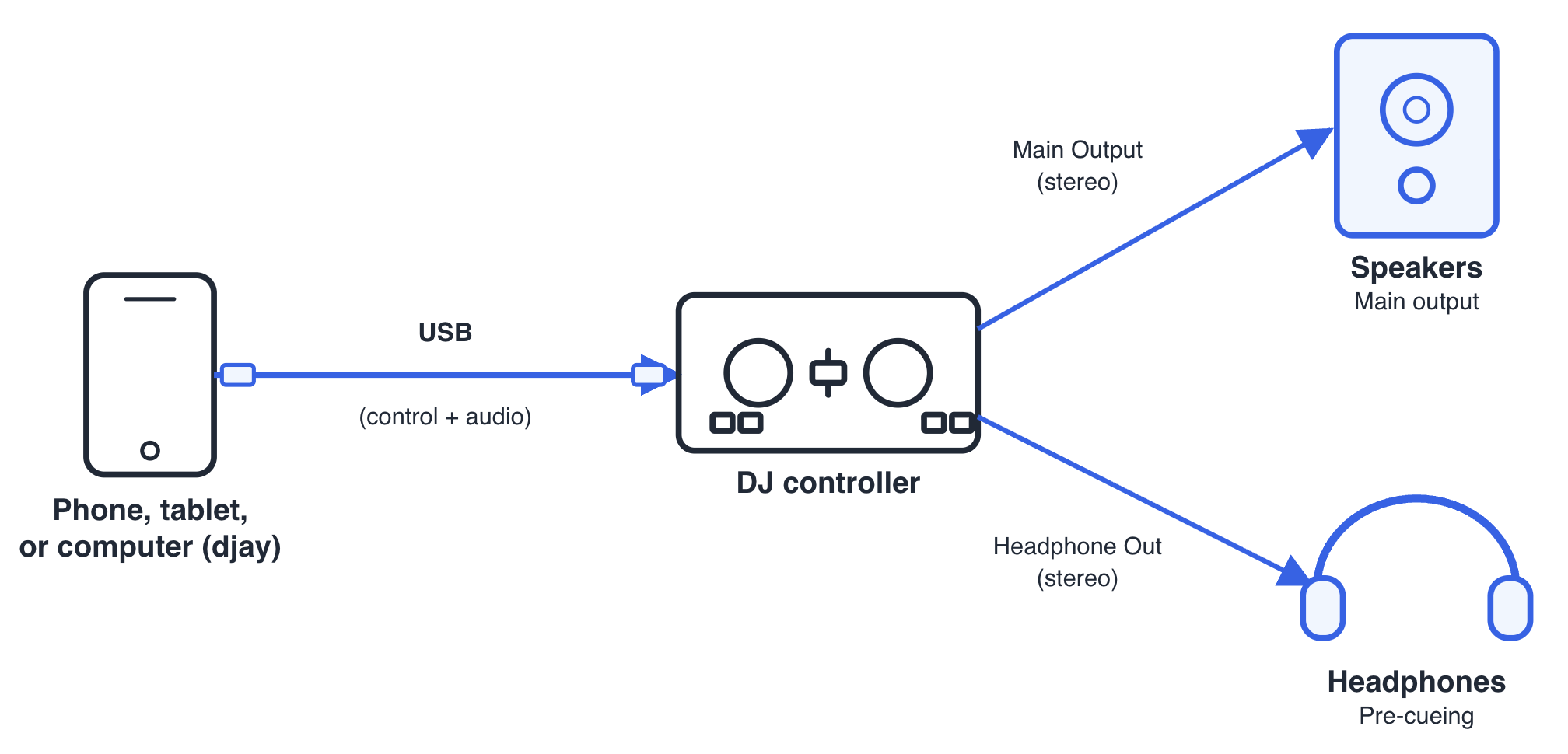
For platform-specific pairing and cable steps, see How do I connect a MIDI controller to my device and djay?
Once your controller is connected by USB, you get its full audio setup (Main Output and headphone output) plus MIDI control, all over the same cable. You don't also need a Bluetooth MIDI connection at the same time.
If you still want to stay wireless
If your controller supports Bluetooth MIDI and you want to control djay without a cable, you can do so using a DJ split cable connected to your device's headphone jack.
-
In djay, go to Settings > Devices > Pre-Cueing and choose Split Output.
-
Connect a DJ split cable to your device's headphone jack.
-
Plug your speakers into one side of the split cable for the main mix, and your headphones into the other side for cue preview.
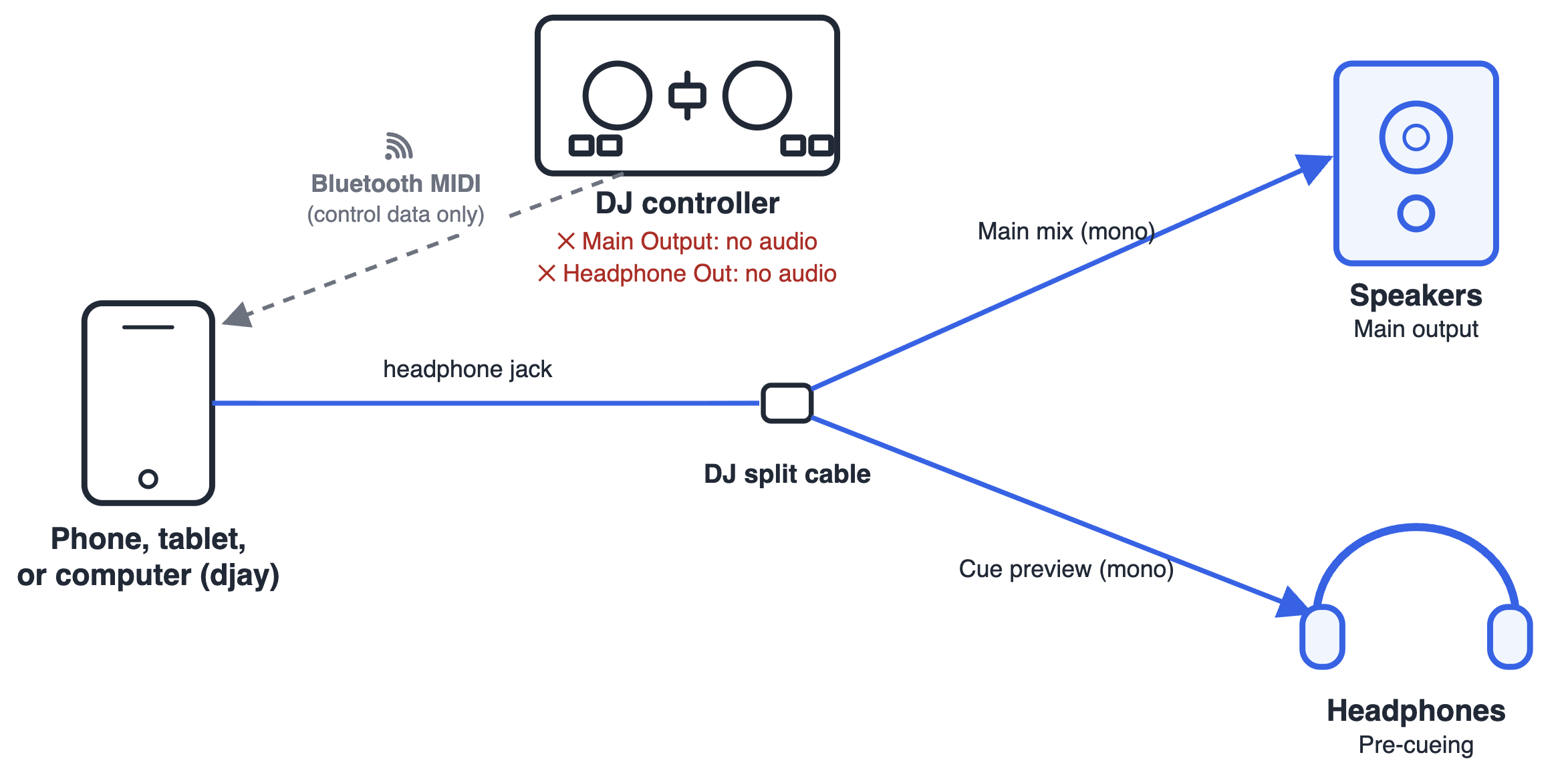
Split Output divides your device's single stereo signal in two, so both the main mix and your cue preview play in mono rather than stereo.
Example: Numark Party Mix III
The Numark Party Mix III is a good example of how this plays out. It connects to djay either way:
-
With the Numark Party Mix III connected to your device via USB-C: its Main Output (speaker connection) and headphone output both work normally, alongside full MIDI control.
-
With the Numark Party Mix III connected wirelessly to your device via Bluetooth MIDI: djay receives MIDI input from the controller, but its main output and headphone output are disabled. You'd listen through your phone's or tablet's own speaker, or headphones plugged directly into it instead.
Both setup scenarios are covered in the steps above.