


How can I use my iTunes library with djay Pro for Windows?
To use your iTunes library with djay Pro for Windows, you must enable iTunes to share its Library XML file. Once enabled, djay Pro can automatically read your library or allow you to manually select a custom library location.
Enable iTunes Library XML Sharing
Please follow these steps to allow djay Pro to access your iTunes library:
- Open iTunes.
- Click Edit → Preferences…
- Select the Advanced tab.
- Enable Share iTunes Library XML with other applications.
- Click OK.
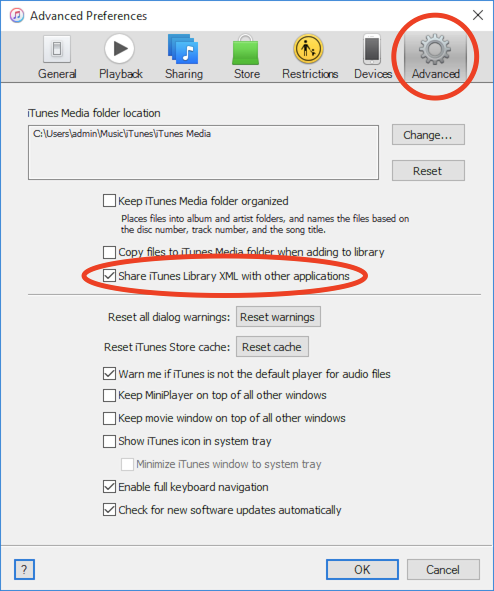
You should now be able to access your iTunes library in djay Pro by selecting the iTunes icon in the media library.
Changing Your iTunes Library Location
If your iTunes library is not stored in the default Music folder, you can manually select it in djay Pro:
- Follow the steps above to enable iTunes Library XML sharing in iTunes.
- Open the djay Pro settings side panel.
- Select Media library settings.
- Click Select iTunes library.
- Navigate to the folder where your iTunes library is stored.
- Select the iTunes Music Library.xml file and click Open.
note
The file may be named slightly differently depending on your iTunes version (e.g., iTunes Library.xml).