


Connecting Phase
Phase is a wireless DJ system that lets you control digital tracks on a DVS setup without using timecode vinyl. Instead of relying on traditional needle and tone signal, Phase sends rotational data from the platters directly to your DJ software.
This is ideal for DJs who love the feel of real turntables but want a stable, modern digital workflow. With Phase integration built directly into djay Pro, you can enjoy ultra-low-latency performance and a clutter-free setup—no timecode vinyl or extra DVS interface required. Phase eliminates issues caused by dust, vibrations, or worn-out needles.
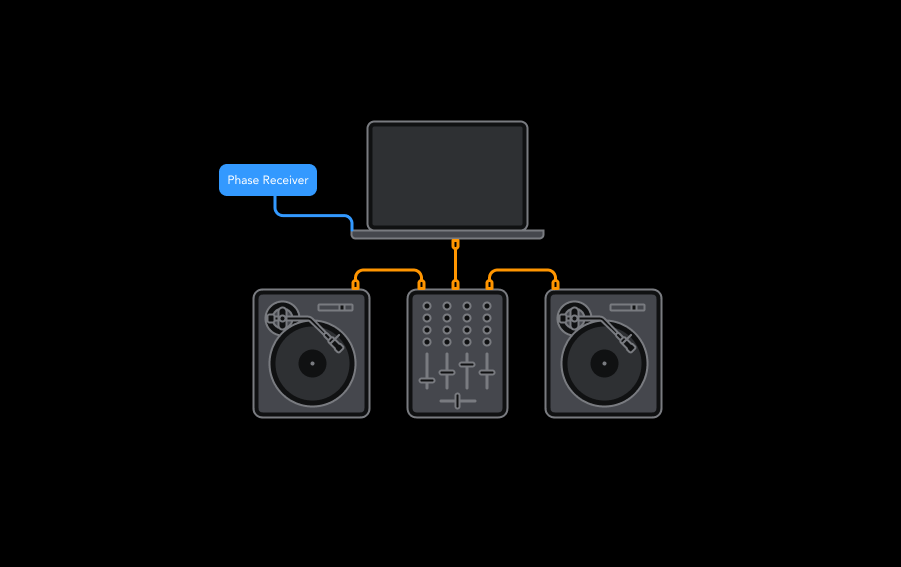
How to set up Phase in DVS mode (via RCA)
- Connect your DVS mixer to your device.
- Set the deck mode to USB to enable DVS mode.
- Connect your Phase to a power supply via USB.
- Connect the Phase Receiver to the Line inputs of your mixer (or DVS soundcard) via RCA.
- In the Phase Manager Setup tab, set the Phase DVS signal to Custom at 1000hz.
- Open djay Pro and enable DVS in the settings, and set the decks mode to Relative.
- Now, place your Remotes on top of your records, and wait a few seconds for the calibration to complete before you start spinning.
- Your Phase should now be ready.
Your DVS interface will need to be compatible with djay PRO and Phase to work properly.
How to set up Phase in HID mode (via USB)
- Plug in your Phase Receiver and any mixer/controller you have.
- Open djay Pro.
- In djay Pro, set the deck control to WIR (the dedicated control mode for Phase).
- Place the Remotes on top of the records, and wait a few seconds for calibration before spinning (Make sure your magnetic stickers are well in place before).
- Your Phase is now ready.
Make sure your Phase system has the latest firmware installed. You can update it via the Phase Manager app from MWM.