Saved cue points and cue loops
Cue points and loops are the building blocks of a DJ performance. djay makes it easy to store them for later, so you can jump to key moments or trigger loops instantly during a mix. With saved cue points, saved loops, and cue loops, you can prepare tracks in advance and mix with confidence.
The Cue Points & Saved Loops tab gives you access to all of your saved cue points, along with two additional saved loop slots.
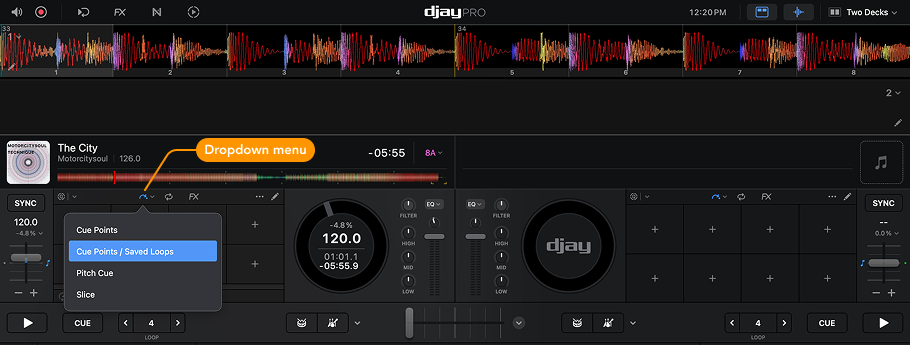
If you’ve already saved loops for a track, the first two will be displayed in the additional slots. If no loops are saved yet, any new loops you create will automatically be added to slots 1 and 2 of the Saved Loops panel.
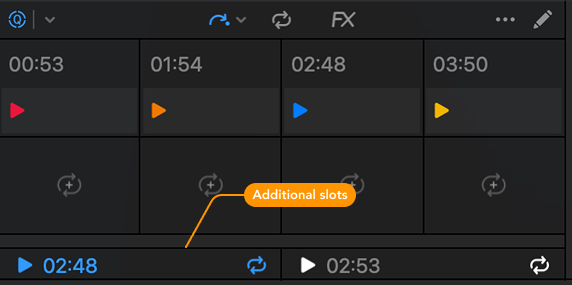
Use the two saved additional loops for quick access to intro and outro loops—perfect for smooth mixing and transitions.
Cue loops
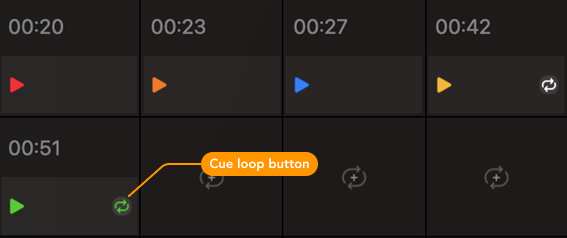
Cue loops let you save a loop together with a cue point. When you create a loop and assign a new cue point, that loop will be stored with the cue. Whenever you trigger the cue point, the loop will automatically activate.
A Cue Loop button appears on the right side of the assigned cue point pad. You can trigger this button independently to exit the loop, or use hardware mapped to the cue loop commands in the MIDI Configuration menu.