


Pitch cue
Pitch Cue transforms your saved cue points into a playable instrument. By spreading a cue point across pads tuned to different notes in a musical scale, you can perform melodies, harmonies, and creative variations directly from your tracks. It’s a powerful way to turn key moments in a song—like vocals or melodies—into something new and musical.
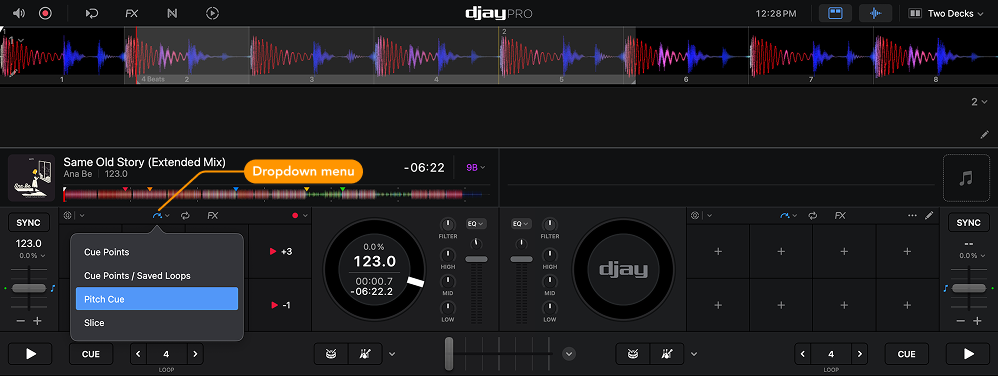
When you select a cue point, the pads display that same cue point transposed into eight different keys within a musical scale.
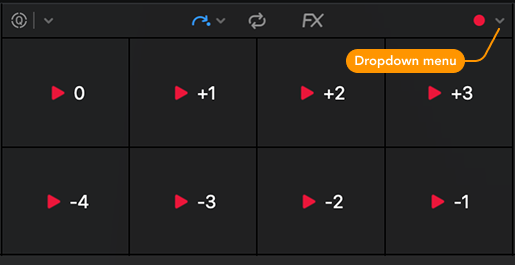
To adjust settings or choose which cue point to use, open the Pitch Cue dropdown menu. From the menu, you can:
- View all saved cue points
- Switch between cue points
- See color-coded and time-stamped labels for easy identification
- Change the musical scale
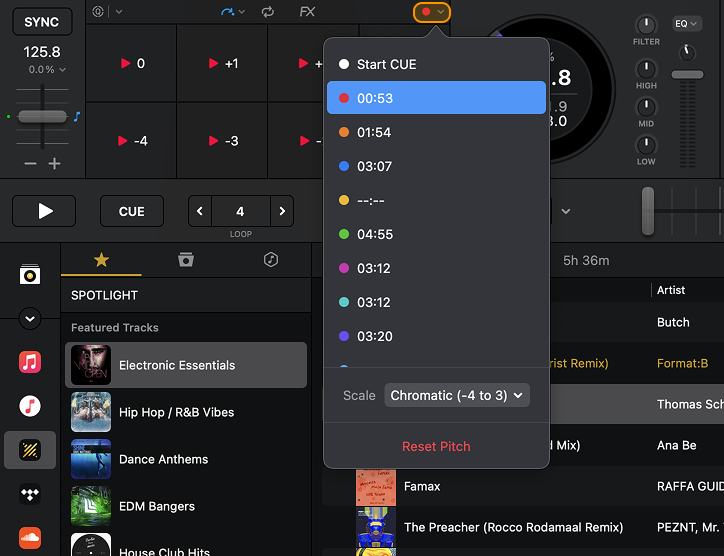
Choose between Chromatic (-7 to 0), Chromatic (-4 to 3), Chromatic (0 to 7), Major, Minor, or Blues scales.
If you’ve adjusted the pitch and want to return to the track’s original key, click the Reset Pitch button.
Pitch Cue works best with cue points set on melodic or vocal parts of a track. Avoid using it with percussive sounds, as they may not translate well across different pitches.