


Essential tools
Essential tools give you quick access to powerful DJ controls right next to the crossfader, so you can apply effects or isolate stems without opening the full FX panel. This keeps your most-used tools close at hand during a mix.
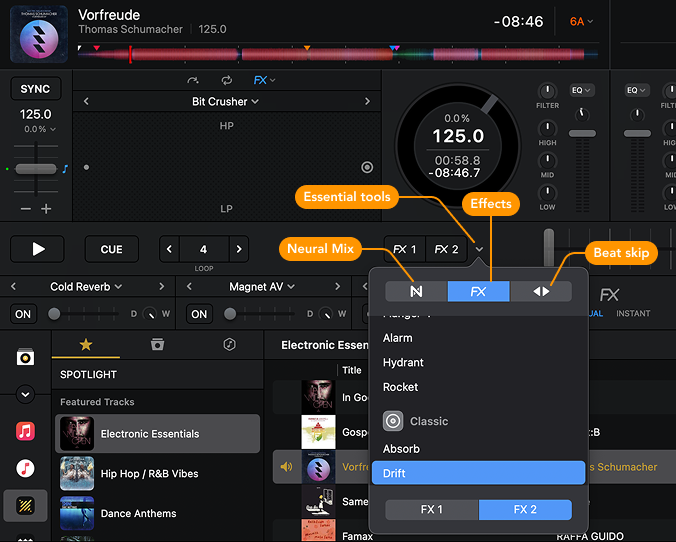
You can switch between Neural Mix™, FX, and Beat Skip via the Essential tools dropdown.
To open Essential tools, click the dropdown menu next to the two Essential tools slots. Essential tools are active when the buttons are highlighted.
Neural Mix™
Neural Mix™ essential tools let you quickly isolate stems at the tap of a button. Choose between two group options:
-
Instrumental – Acapella: combines the melodic and harmonic elements with the isolated vocals (acapella).
-
Percussive – Tonal: separates the rhythmic elements (drums and percussion) from the melodic and harmonic elements (basslines, chords, and melodies).
Enable Mute FX to add echo tails when muting or soloing stems. This softens the cut and makes transitions sound smoother and more polished.
FX
FX mode gives you two dedicated FX channels, available even when the FX panel is closed. You can assign two favorite effects for quick access and swap them out as needed.
Beat skip
Beat Skip mode brings the beat skip controls to the forefront, even when the Beat Skip section is closed, so you can jump through tracks while staying on beat.