


Keyboard shortcuts
Keyboard shortcuts help speed up your workflow and stay in the mix—no need to reach for your mouse or trackpad. Whether you're using the default layout or customizing your own, this section helps you streamline your setup.
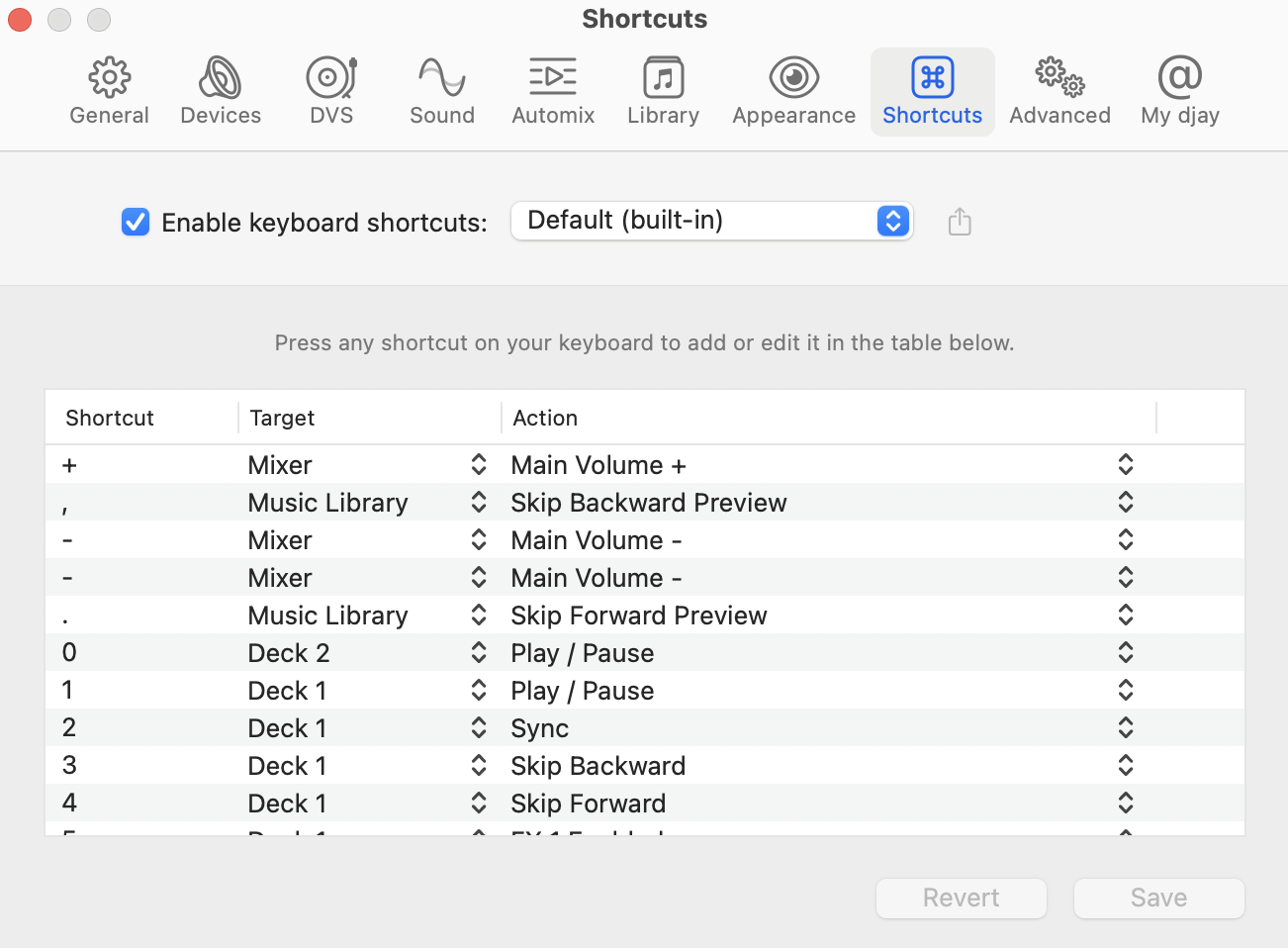
Once shortcuts are enabled, you can choose from the following:
- Default: djay’s built-in set of shortcuts, optimized for intuitive control.
- Open Format DJ: A shortcut layout that mirrors common setups in other DJ software—great for DJs switching over from apps.
- New Shortcut Set: Create and name a custom shortcut set tailored to your specific workflow.
- Edit list: Edit individual shortcuts to fit your preferred layout and performance style.
tip
You can also assign or edit any shortcut simply by pressing the keys you want to use. Use the Revert button to undo changes and restore the previous mapping.
Default keyboard shortcuts
Check out the full list of default shortcuts, so you can quickly learn the key commands and keep your mixes flowing without breaking focus.
Mixer
| Shortcut | Action |
|---|---|
| + / = | Main volume+ |
| - | Main volume - |
| F | Cut crossfader |
| G | Auto cut |
| H | Auto cut (fast) |
| ← | Transition to left |
| → | Transition to right |
| ⌘↑ | Transition to middle |
| ⇧⌃← | Crossfade to left |
| ⇧⌃↑ | Crossfade to middle |
| ⇧⌃→ | Crossfade to right |
| ⇧⌘← | Crossfade to left |
| ⇧⌘↑ | Crossfade to middle |
| ⇧⌘→ | Crossfade to right |
| ⇧⌘↩ | Transition to inactive deck |
| ⌃← | Crossfade to left (stepwise) |
| ⌃→ | Crossfade to right (stepwise) |
| ⌥+ / ⌥= | Monitor volume+ |
| ⌥- | Monitor volume - |
| ⌥← | Crossfade monitor to left |
| ⌥↑ | Crossfade monitor to middle |
| ⌥→ | Crossfade monitor to right |
| ⌥↓ | Mute/unmute monitor |
| ⌃⌥M | Deck 2: kill line volume |
| ⌃⌥X | Deck 1: kill line volume |
| ⌥Z | Cue active deck |
Deck 1
| Shortcut | Action |
|---|---|
| 1 | Play / Pause |
| 2 | Sync |
| 3 | Skip backward |
| 4 | Skip forward |
| 5 | FX 1 enabled |
| A | Autoloop |
| D | Loop out / half |
| E | Jump to cue point 2 |
| Q | Jump to start CUE |
| R | Jump to cue point 3 |
| S | Loop in / half |
| T | Jump to cue point 4 |
| W | Jump to cue point 1 |
| ⇧2 | Match key |
| ⇧5 | FX 1 Select next |
| ⇧⌘D | Instant double |
| ⇧⌥1 | Absorb FX |
| ⇧⌥2 | Drift FX |
| ⇧⌥3 | Sway FX |
| ⇧⌥4 | Crush FX |
| ⇧⌥5 | Twist FX |
| ⇧⌥A | Reset all sliders |
| ⇧⌥B | Record sample |
| ⌃1–5 | Bounce loop 1/16 → 1 |
| ⌃A | Gain - |
| ⌃C | Kill mid EQ |
| ⌃D | Mid EQ - |
| ⌃E | Mid EQ + |
| ⌃F | High EQ - |
| ⌃Q | Gain + |
| ⌃R | High EQ + |
| ⌃S | Low EQ - |
| ⌃V | Kill high EQ |
| ⌃W | Low EQ + |
| ⌃X | Kill low EQ |
| ⌃⌥3 | Tempo - |
| ⌃⌥4 | Tempo + |
| ⌃⌥5 | Key lock on/off |
| ⌥1 | Reverse |
| ⌥2 | Set downbeat |
| ⌥3 / ⌥4 | Pitch bend - / + |
| ⌥5 | FX 2 Enabled |
| ⌥A | Reloop / Loop off |
| ⌥D | Loop double |
| ⌥E | Set cue point 2 |
| ⌥Q | Set start CUE |
| ⌥R | Set cue point 3 |
| ⌥S | Loop half |
| ⌥T | Set cue point 4 |
| ⌥W | Set cue point 1 |
| ⌥⌘1 | Brake transition FX |
| ⌥⌘2 | BPM tap |
Deck 2
| Shortcut | Action |
|---|---|
| 0 | Play / Pause |
| 6 | FX 1 enabled |
| 7 | Skip backward |
| 8 | Skip forward |
| 9 | Sync |
| I | Jump to cue point 2 |
| J | Loop in / half |
| K | Loop out / half |
| L | Autoloop |
| O | Jump to cue point 1 |
| P | Jump to start CUE |
| U | Jump to cue point 3 |
| Y | Jump to cue point 4 |
| ⇧6 | FX 1 Select next |
| ⇧9 | Match key |
| ⇧⌘J | Instant double |
| ⇧⌥6 | Absorb FX |
| ⇧⌥7 | Drift FX |
| ⇧⌥8 | Sway FX |
| ⇧⌥9 | Crush FX |
| ⇧⌥L | Reset all sliders |
| ⇧⌥N | Record sample |
| ⇧⌥P | Clear cue points |
| ⌃0 / 6–9 | Bounce loops |
| ⌃B | Kill low EQ |
| ⌃H | Low EQ - |
| ⌃I | Mid EQ + |
| ⌃J | Mid EQ - |
| ⌃K | High EQ - |
| ⌃L | Gain - |
| ⌃M | Kill high EQ |
| ⌃N | Kill mid EQ |
| ⌃O | High EQ + |
| ⌃P | Gain + |
| ⌃U | Low EQ + |
| ⌃⌥6 | Key lock on/off |
| ⌃⌥7 / 8 | Tempo - / + |
| ⌃⌥O | Set Automix end point |
| ⌃⌥P | Set Automix start point |
| ⌥0 | Reverse |
| ⌥6 | FX 2 Enabled |
| ⌥7 / ⌥8 | Pitch bend - / + |
| ⌥9 | Set downbeat |
| ⌥I | Set cue point 2 |
| ⌥J / K | Loop half / double |
| ⌥L | Reloop / Loop off |
| ⌥O | Set cue point 1 |
| ⌥P | Set start CUE |
| ⌥U | Set cue point 3 |
| ⌥Y | Set cue point 4 |
| ⌥⌘0 | Brake transition FX |
| ⌥⌘9 | BPM tap |
Sampler
| Shortcut | Action |
|---|---|
| B | Right sampler: Play sample 1 |
| C | Left sampler: Play sample 2 |
| M | Right sampler: Play sample 3 |
| N | Right sampler: Play sample 2 |
| V | Left sampler: Play sample 3 |
| X | Left sampler: Play sample 1 |
| ⌥B | Right sampler: Play sample 4 |
| ⌥C | Left sampler: Play sample 5 |
| ⌥M | Right sampler: Play sample 6 |
| ⌥N | Right sampler: Play sample 5 |
| ⌥V | Left sampler: Play sample 6 |
| ⌥X | Left sampler: Play sample 4 |
| ⌘6 | Toggle Sampler |
Looper
| Shortcut | Action |
|---|---|
| ⌘7 | Toggle Looper |
Music Library
| Shortcut | Action |
|---|---|
| , / . | Preview back / forward |
| ↩ | Toggle library expanded |
| ⇧⌘N | New playlist folder |
| ⌃⌘N | New smart playlist |
| ⌘B | Toggle split library |
| ⌘K | Toggle library panel |
| ⌘L | Locate track |
| ⌘N | New playlist |
| ⌘R | Refresh library |
| ⌘§ | Preview selected track |
| ⌘← | Load track on Deck 1 |
| ⌘→ | Load track on Deck 2 |
| ⌘↩ | Add selected tracks to Queue |
| ⌘⌫ | Remove selected tracks |
General
| Shortcut | Action |
|---|---|
| Space | Play / Pause |
| ⇧K | Show keyboard shortcuts |
| ⇧M | Toggle microphone |
| ⇧P | Show pre-cueing panel |
| ⇧⌘A | Automix on/off |
| ⌘+ / - | Waveform zoom in / out |
| ⌘1–5 | Toggle Toolbars / Waveforms |
| ⌥⌘R | Recording on/off |