


External mixers
External mixing lets you route each deck’s audio signal from djay into a physical DJ mixer. This setup gives you hands-on control over EQs, volume, and crossfading using your hardware mixer—ideal for club environments, multi-deck setups, or DJs who prefer using traditional gear.
djay supports external mixing with up to four decks using a compatible mixer and audio interface.
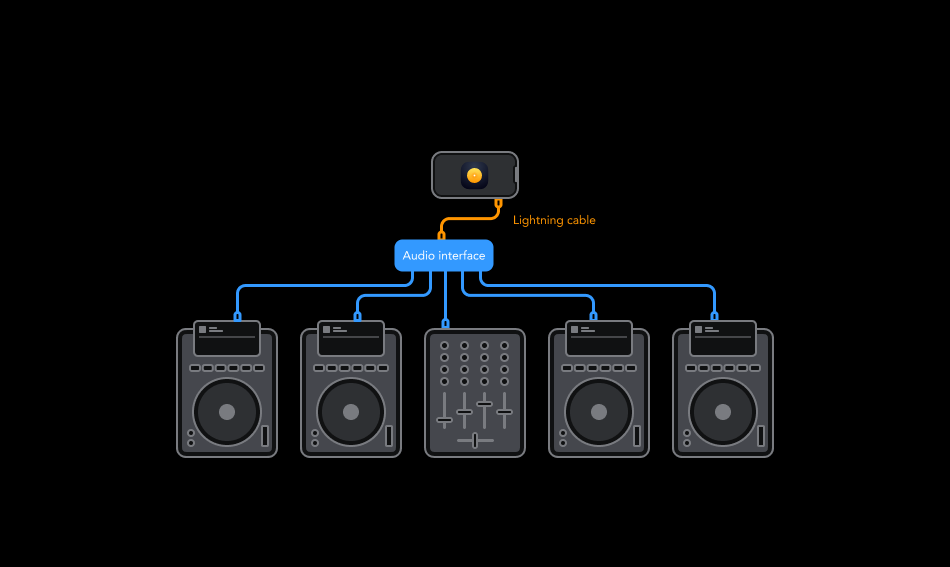
How to connect an external mixer
- If you're using both a mixer and a separate audio interface, connect the outputs of your audio interface to the corresponding channel inputs on your mixer.
- Connect the mixer or audio interface into your device using a Lightning adapter with charging capability and turn the mixer on.
- Go to Dashboard > Settings > Audio devices.
- Switch your Audio to External via Mixer Mode. You can now assign stereo outputs for individual decks, pre-cueing, the Sampler, and the Looper.
- Tap Apply to save your settings, and make sure your mixer is powered on.
- You're now ready to mix with djay and your external DJ mixer.