


Neural Mix™ toolbar
The Neural Mix™ toolbar is where you take hands-on control of a track’s stems. From here, you can mute, solo, or adjust the levels of vocals, drums, bass, and harmonics. Whether you’re layering acapellas, stripping back the drums for a smooth transition, or isolating a bassline for dramatic effect, the toolbar makes it easy to tailor Neural Mix™ to your workflow.
Neural Mix™ toolbar
To open the Neural Mix™ toolbar, click the Neural Mix™ icon in the main toolbar.

Once the Neural Mix™ toolbar is open, click the dropdown menu to choose how many and which types of stem controls to display—two, three, or four. The number of stems you select will be reflected by the number of stem controls in the toolbar.
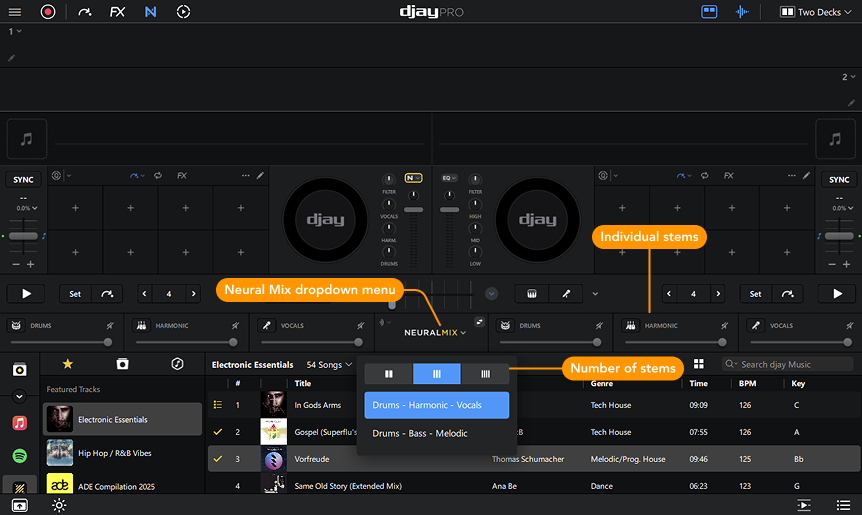
Two stems
Groups controls into:
- Instrumental & Acapella
- Percussive & Tonal
Three stems
Choose between:
- Drums & Harmonic & Vocals
- Drums & Bass & Melodic
Four stems
Displays all available elements:
- Drums, Bass, Harmonic, and Vocals
You can mute, solo, and adjust the volume of each stem from the instrument stem controls section. This flexibility allows you to tailor Neural Mix™ to your workflow and mixing style.
