


Slice
Slice splits a looped section of your track into smaller slices that you can trigger in real time. Use it to remix rhythms, repeat vocals, or create live performance effects—without losing the beat. It’s a powerful way to add variety and spontaneity to your mix.
You can trigger slices using your keyboard, mouse, or touchscreen via the Slice section. For the best experience, map them to buttons or pads on a MIDI controller. Controllers with dedicated slice pads offer the most intuitive workflow.
Find out more about MIDI mapping in the MIDI Mapping section.
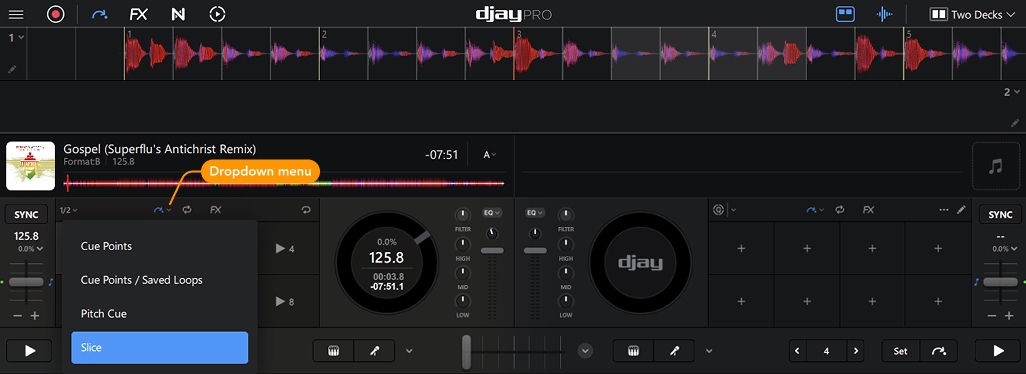
When Slice is active, the eight pads divide the loop into equal slices. Each pad jumps to its corresponding slice and plays it back while held. When you release the pad, playback automatically jumps back to the correct position in the track.
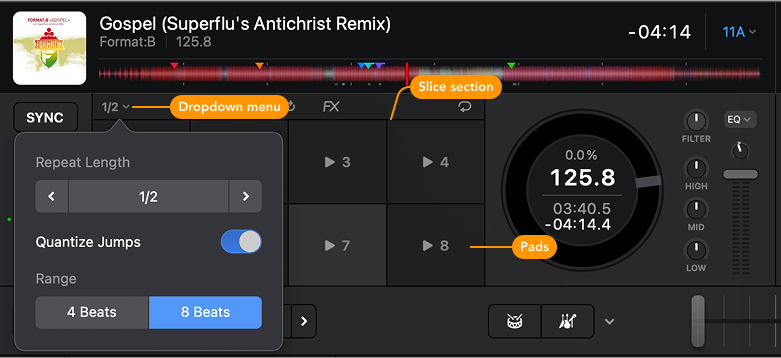
Open the dropdown menu to:
- Set the repeat length (from 1/8 beat to 1 beat)
- Toggle Quantize Jumps on or off
- Switch between 4- or 8-beat slicing
Slice works best on looped sections with a clear beat—like a drum break, vocal phrase, or build-up—making it ideal for live remixing, creative transitions, and adding flair to familiar tracks.