


Search and filter tracks
Finding the right track is key to a great mix. To locate a specific song, select your preferred library—My Collection, djay Music, or a connected streaming service—and use the search bar to find it quickly.
Filters are a powerful way to spark inspiration and discover new mix ideas. You can filter your library by Artist, BPM, Color, Genre, Key, Label, Play Count, and Title to find tracks that fit your creative direction.
-
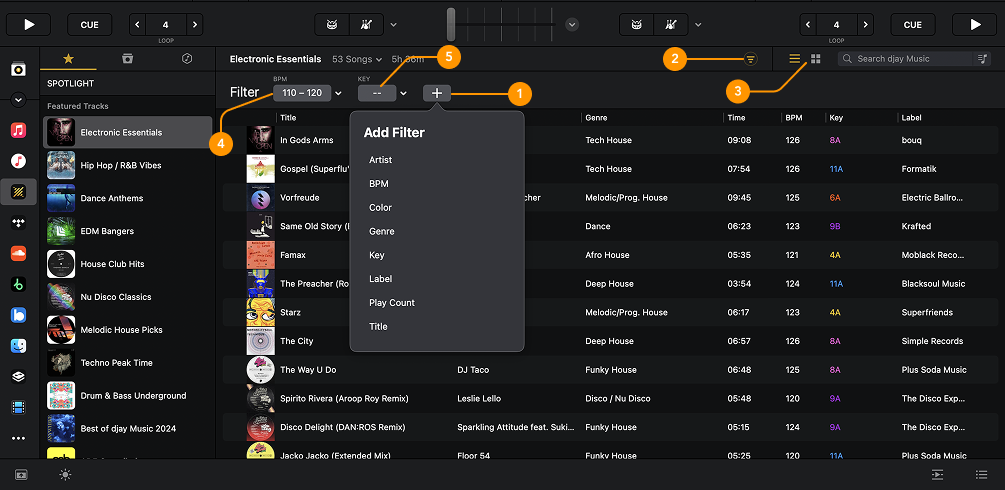
Add filter: Create a new filter using options like Artist, BPM, Color, Genre, Key, Label, Play Count, or Title to quickly narrow down your track list.
-
Filter icon: Shows or hides the Filter bar, where you can manage all active filters.
-
Change view: Switch between Compact view (which shows track metadata) and Artwork view (which highlights the track’s cover art).
-
BPM filter: Refine your selection by entering a specific BPM range for more accurate beat matching.
-
Key filter: Include or exclude tracks based on their musical key to help create harmonic mixes.
How to use the filter toolbar

The Filter toolbar above the tracklist helps you quickly narrow down your selection. Click the Filter icon, then the + button to add a new filter. Use the dropdown menus to choose from options like is, is not, is greater than, and more to pinpoint exactly what you're looking for.
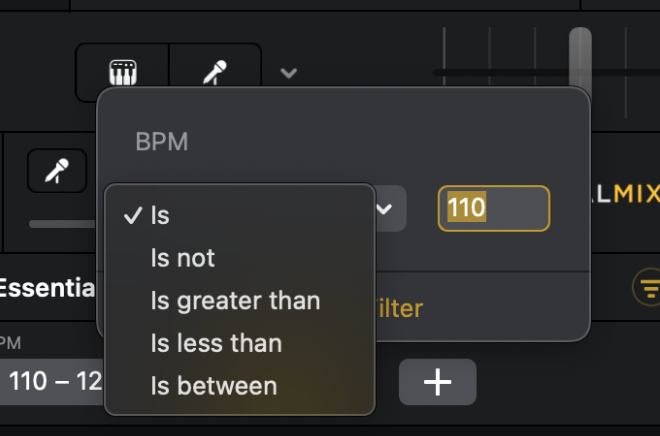
Click the filter box to toggle filters on or off. If the box is highlighted orange, the filter is active.

To remove a filter, click the dropdown menu next to it and select Remove filter.