


Playlists
Playlists are essential for every DJ. They help you structure sets, organize tracks, and create specific moods, so you can quickly find the perfect song while you're in the flow.
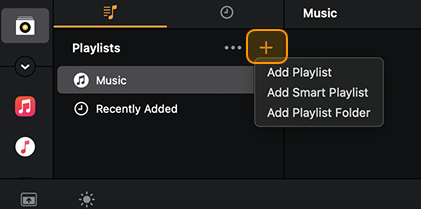
How to create a playlist
- Click My Collection.
- Open the Playlists browser.
- Click the + button and select Add Playlist from the menu.
- A new blank playlist will appear.
- Rename your playlist.
- Drag and drop tracks from your collection into the new playlist.
To rename or delete a playlist, right-click or press delete on the playlist name.
Drag-and-drop tracks using Split library mode—learn more in the Split library mode section.
Smart playlists
Smart playlists automatically group your tracks based on custom filter rules. As you add new music, it’s instantly organized into the right playlists for you.
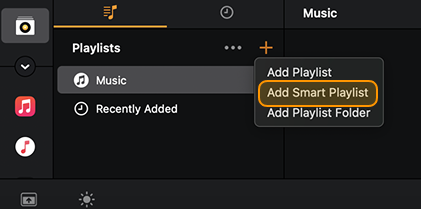
How to create smart playlists
- Go to My Collection.
- Click the + button.
- Click Add Smart playlist.
- Click on the new smart playlist.
- Click the + button to add filtering rules.
You can build smart playlists using a wide range of track information and filters, including: Added, Album, Artist, BPM, Color, Comments, Composer, Genre, Grouping, Key, Label, Play Count, Rating, Released, Title, and Year.
Depending on the rules you choose, you can set different parameters:
- Contains
- Does not contain
- Is
- Is not
- Is greater than
- Is less than
- Is between
- Begins with
- Ends with
For example, you can create a filter such as: BPM is less than 115, if you want to group slower tracks automatically.
To rename or delete a smart playlist, right-click or press delete on the playlist name.
You can add multiple filters to a playlist. Click the filter to toggle filters on or off. If the filter is highlighted orange, the filter is active.
Playlist folders
Playlist folders help you keep multiple playlists organized in one place.
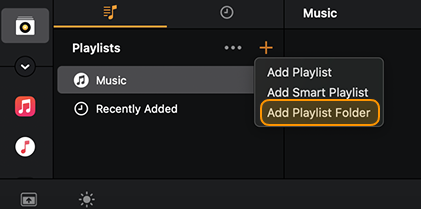
How to create a playlist folder
- Go to My Collection.
- Click the + button.
- Click Add playlist folder.
- Enter a name for the folder.
Once the folder is created, you can add new playlists or smart playlists using the + button, or move existing playlists into the folder.
To rename or delete a smart playlist, right-click or press delete on the playlist name.