


Building a sequence with Sampler
The Sampler Sequencer turns samples into rhythmic patterns you can record and loop. It’s an intuitive way to layer beats, textures, or effects, letting you build sequences that can lock perfectly to the tempo of your mix. Whether you’re adding percussion to a track or creating loops from scratch, the sequencer makes it easy to bring extra rhythm and creativity into your set.
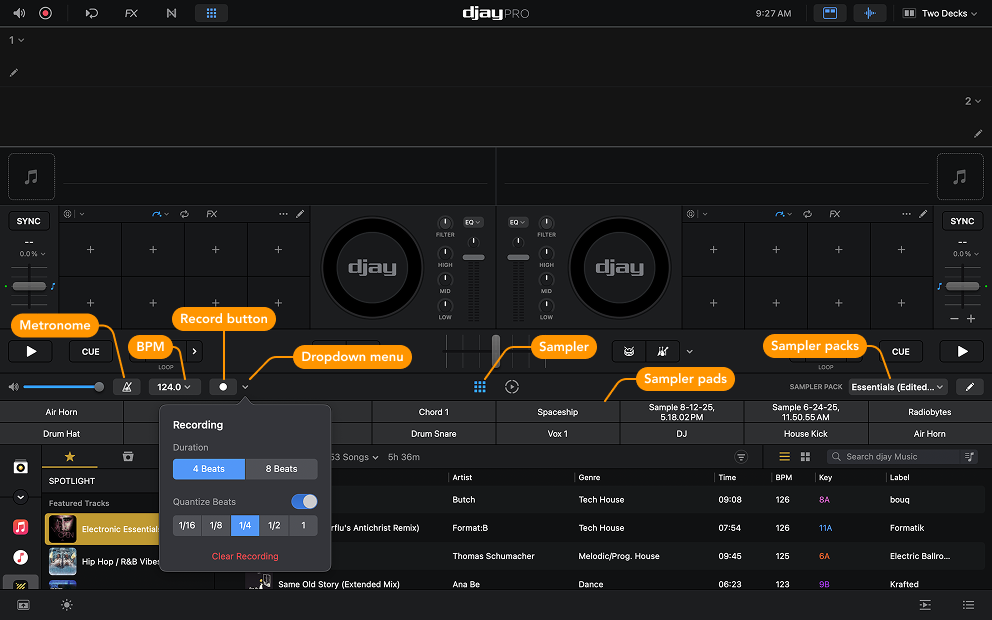
The default loop length is one 4-beat bar, but you can extend it to 8 beats and adjust quantization from the Recording dropdown menu.
How to record a sampler sequence
- Click the Sampler icon in the toolbar beneath the crossfader.
- Choose and load a sample pack from the sampler packs dropdown menu.
- Start playback on a track if you want to sequence over a song, or build a loop on its own.
- Click the metronome icon to enable the click track. If a track is playing, the metronome syncs to its BPM. If not, it uses the BPM that’s set in the Recording options.
- Click Record to begin sequencing.
- Listen for the downbeat in the metronome—it has a slightly higher pitch than the other beats. A visual indicator also shows your current position in the loop.
- Start building your rhythm by clicking the pads in the grid. You can overdub (record over the existing sounds) by playing additional sounds over the existing sequence.
tip
You can switch sample packs while recording to swap out sample sequences on the fly.