BPM and beat sync
Keeping tracks in sync is one of the foundations of DJing. djay Pro gives you flexible options to match tempos and align beats, whether you prefer to handle beatmatching manually or let the software lock everything in for you.
With modes for BPM Sync and BPM + Beat Sync, plus helpful tools like Soft Takeover and the Ghost Fader, you can choose the workflow that best fits your mixing style and setup.
There are two ways to sync tracks in djay Pro: BPM Sync and BPM + Beat Sync.
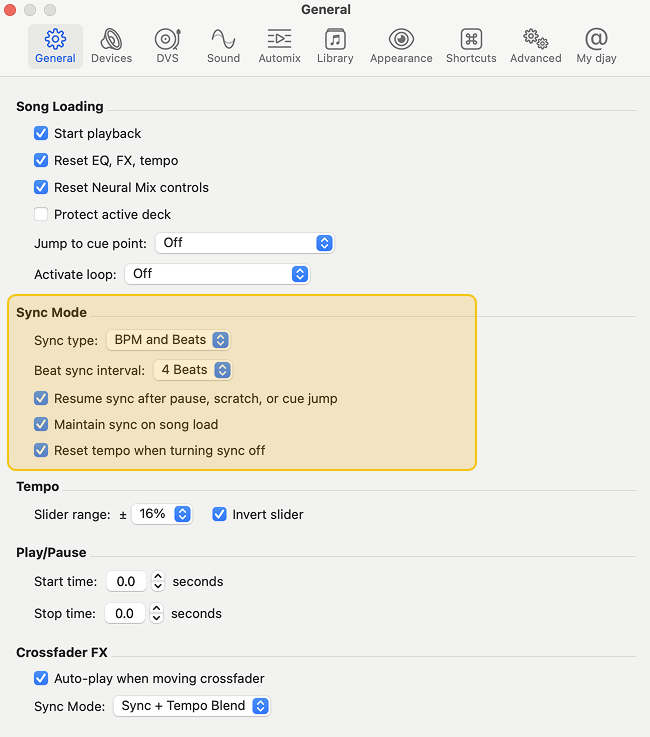
To choose your preferred sync mode, go to Settings > General > Sync Mode > Sync Type.
BPM sync
BPM sync only matches the tempo (BPM) of a track to the current main deck. The tracks will play at the same speed, but their beats are not locked together—allowing you to nudge or beat-match manually.
- To sync a track’s BPM, press the Sync button on the deck you want to match.
- The Sync button label will turn blue when activated.
Crossfader FX will still beat sync regardless of your sync mode, but they will follow the beat sync interval set by the beatgrid.
BPM and Beat sync
This mode matches both the BPM and beat position, aligning the downbeats and locking the beatgrids together. It ensures tracks stay in perfect time with each other.
- Press the Sync button on the desired deck.
- A blue box will appear around the Sync button to show that the BPM and Beats sync is active.

Soft takeover
Soft takeover helps prevent sudden or drastic changes in tempo when using Sync with connected hardware. It ensures you return your hardware fader to the correct position before it takes control again.
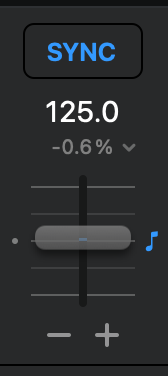
When Sync is active, djay automatically adjusts the on-screen pitch fader to match the tempo. However, your hardware pitch fader stays in its original position, causing a mismatch between the two. Since djay can’t physically move your hardware fader, this difference could lead to sudden tempo jumps when you touch the fader again.
Soft takeover avoids this by requiring you to move your hardware fader to match the on-screen position before it has any effect.
Ghost fader
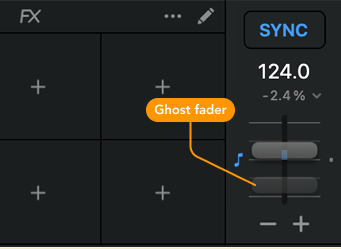
To help with alignment, djay displays a Ghost Fader showing the current tempo position of your hardware fader. This makes it easy to visually match the hardware and software faders before resuming manual control.