


Neural Mix™ overview
Neural Mix™ gives you direct control over the building blocks of a song—vocals, drums, and harmonics—so you can isolate, blend, or reshape them in real time. The interface puts these controls right at your fingertips, making it easy to experiment with stem mixing, create mashups, or fine-tune transitions.
Getting familiar with the Neural Mix™ layout is the first step to unlocking its creative potential.
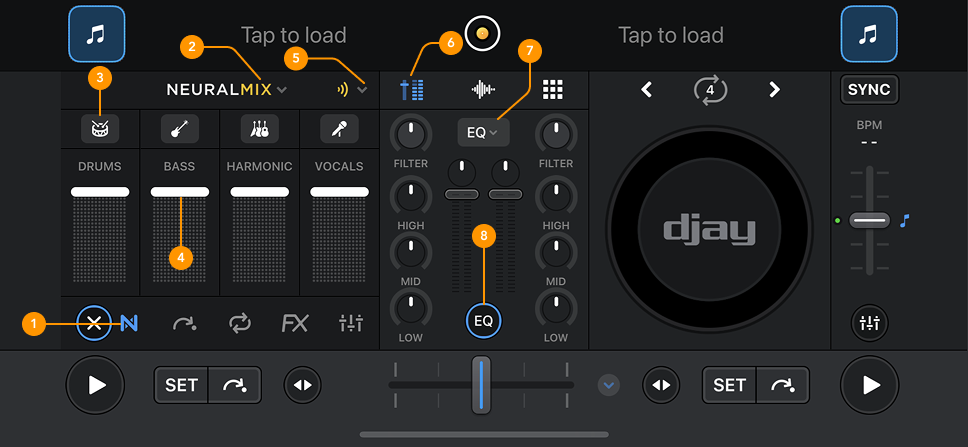
-
Neural Mix™ icon: Tap to show or hide the Neural Mix™ section.
-
Neural Mix™ dropdown: Use this dropdown to choose whether to control grouped stems (e.g., Instrumental/Acapella) or individual stems (e.g., Drums, Harmonics, Vocals).
-
Neural Mix™ solo icons: Tap to solo selected stems instantly.
-
Stem volume faders: Each stem has its own volume fader, letting you mix and blend each element independently.
-
Neural Mix™ mute FX: Trigger optional echo tails when muting or soloing stems. Instead of cutting the audio instantly, Mute FX adds a smooth echo tail, making transitions sound more polished and professional.
You can choose the length of the echo tail:
- 1 beat
- ¾ beat
- ½ beat
-
Mixer: Opens the mixer view. Neural Mix™ EQ and Neural Mix™ crossfaders require the mixer to be open.
-
EQ mode dropdown: Use the dropdown to switch between Classic EQ, Neural Mix™ EQ, and Neural Mix™ crossfaders. When Neural Mix™ EQ is selected, the EQ knobs control the following:
- Low = Drums
- Mid = Harmonics
- High = Vocals
-
EQ options: Reveals the EQ mode dropdown and additional features. When not activated, the mixer shows a streamlined view with volume faders, gain knobs, and a single filter.