


Adding FX to Neural Mix™ stems
Neural Mix™ FX routing lets you apply effects to individual stems within a track. For example, you can add echo only to the vocals, filter just the drums, or apply reverb to the melody—without affecting the rest of the mix. This gives you precise control and opens up new creative options.
How to add FX to individual stems
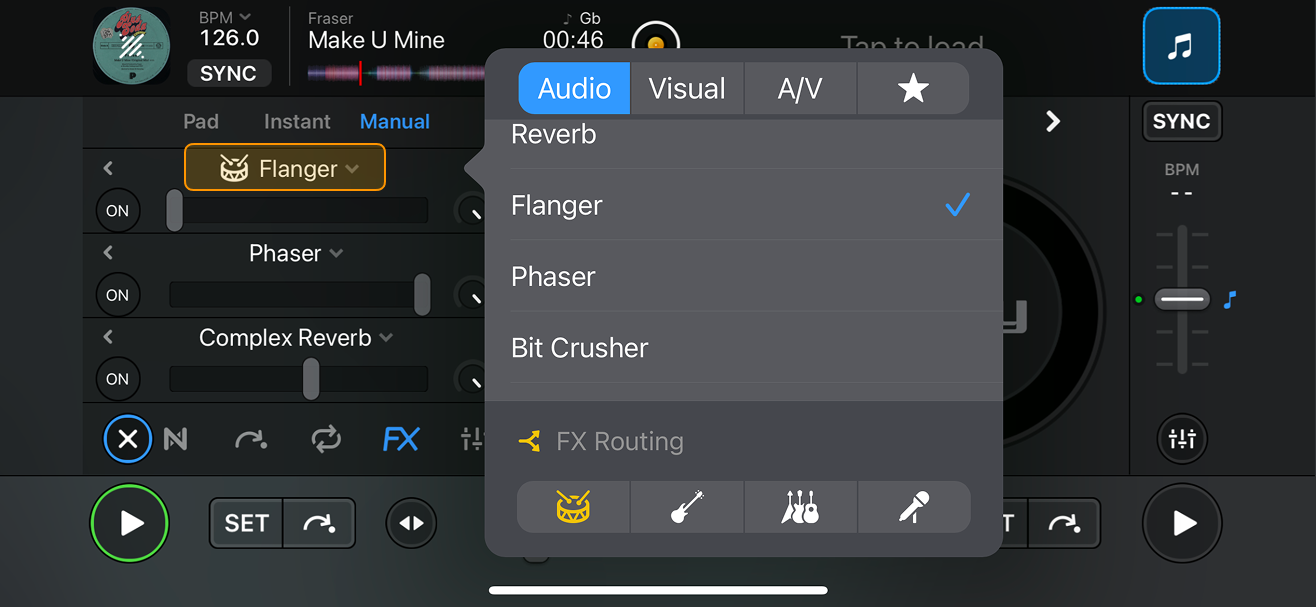
- Open the FX section and select Pad or Manual.
- Tap the dropdown next to an effect name to open the FX menu.
- Select the effect you want.
- Apply the effect to one or more stems by tapping the drums, bass, harmonic, or vocals icons in the FX routing section.
note
FX routing options are based on the stems selected in the Neural Mix™ dropdown. Check the Neural Mix™ overview section for more details.
note
In Manual mode, activate the effect by tapping the On button. Depending on the effect, you can then adjust its parameters using the slider, knob, or beat options.