


Building a loop with Looper
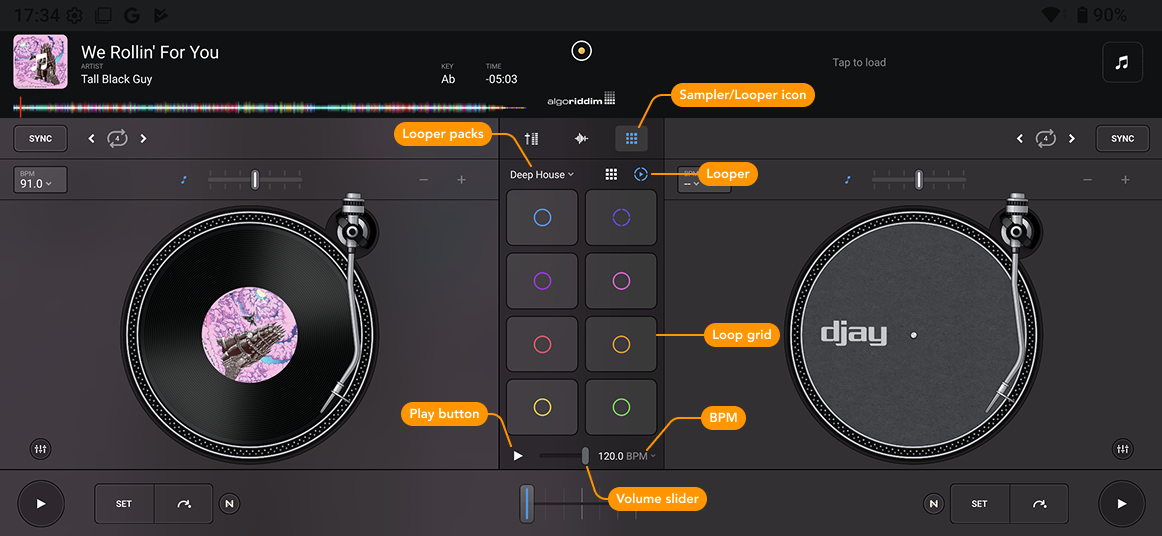
In the Looper view, the loop grid consists of 2x4 pads, each containing a perfectly quantized loop. Trigger the pads to build full grooves with up to eight layers—all in sync with the beat.
When you load a loop pack, each pad represents a different sound category, such as kicks, snares, synths, or vocals. This keeps your loops harmonically and rhythmically compatible, so they sound great together.
All loops are quantized to a 4-beat measure and will stop at the end of the bar when disabled, giving you smooth transitions in and out.
How to build a loop
- Tap the Sampler/Looper icon in Classic mode, and select Looper.
- Choose and load a loop pack from the Looper packs dropdown menu.
- Press play on a track if you want to build loops over it, or just start creating a loop.
- To begin a loop, tap a pad in the grid to trigger a loop. To quickly start a full loop, tap the Play button next to the volume control. This will launch one loop from each column.
- Add or remove loops by tapping them again, or select a different one from the same column.
- Use the BPM dropdown to change the tempo, or tap Reset to return to the pack’s default BPM. If a deck is playing, the Looper will follow the same tempo.
- To stop all active loops, tap the Play button again.