


Canceling your djay subscription
You can manage or cancel your djay PRO subscription at any time through the App Store on your Mac.
How to cancel your subscription
- Open the App Store app.
- Click your name or the sign-in button at the bottom of the sidebar.
- Click View Information at the top of the window (you may be asked to sign in).
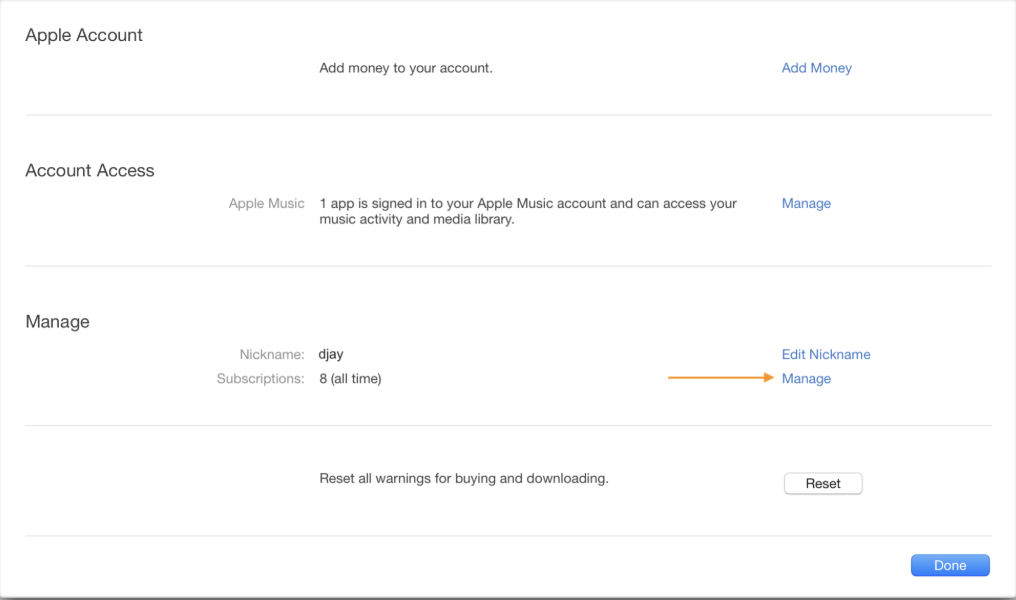
- Scroll down to the Manage section and click Manage next to Subscriptions.
- Click Edit next to your djay subscription.
- Click Cancel Subscription.
If you don’t see Cancel Subscription, your plan is already canceled and won’t renew.
note
When you cancel your subscription, you’ll continue to have full djay Pro access until the end of your current billing period. After that, your plan will revert to the free version, and Pro features will no longer be available.