


Effects overview
Effects are one of the most creative tools a DJ can use—they shape the energy of a track, add texture, and help you put your own stamp on a mix.
With djay, you can choose how to work with FX in a way that fits your style. The FX section brings all the audio effects into one place, with tools for instant triggering or detailed manual control. You can keep things simple when you’re starting out, or build more complex effect chains as your sets get more adventurous.
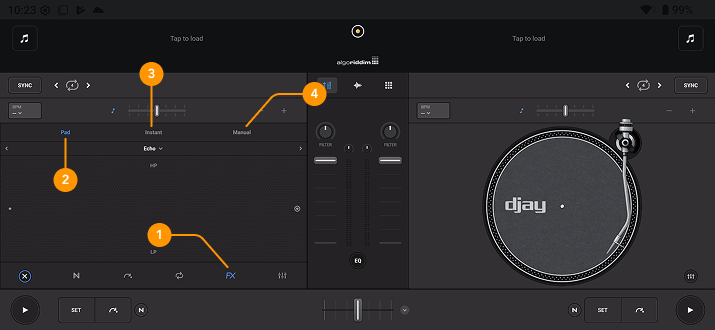
-
FX section: Opens the effects tools, giving you access to both Manual, Instant, and pad effects. To access FX, tap the Tools button.
-
Pad FX: Use the X/Y pad to control effects with expressive finger movements on the touchscreen.
-
Instant FX: Trigger eight one-tap effects. Tap or hold to apply an effect, or enable Hold mode to keep it active automatically.
-
Manual FX: Trigger and chain up to three effects, control the dry/wet amount, and adjust each effect’s parameters.
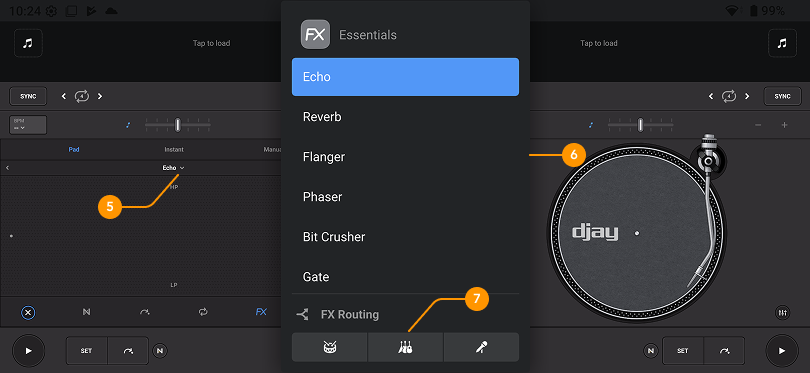
-
Effects dropdown menu: Opens the full list of Audio FX. Experiment with reverbs, echoes, sweeps, filters, flangers, and more.
-
FX list: Browse the list of all available audio effects.
-
FX routing: Choose to apply FX to individual drums, harmonics, or vocal stems using Neural Mix™.
FX routing options are based on the stems selected in the Neural Mix™ dropdown. Check the Neural Mix™ overview section for more details.