


Cancel your djay subscription
You can manage or cancel your djay subscription at any time through your device settings. Tap this link via your iOS device to manage your subscriptions, or follow the steps below on your device.
How to cancel a subscription
-
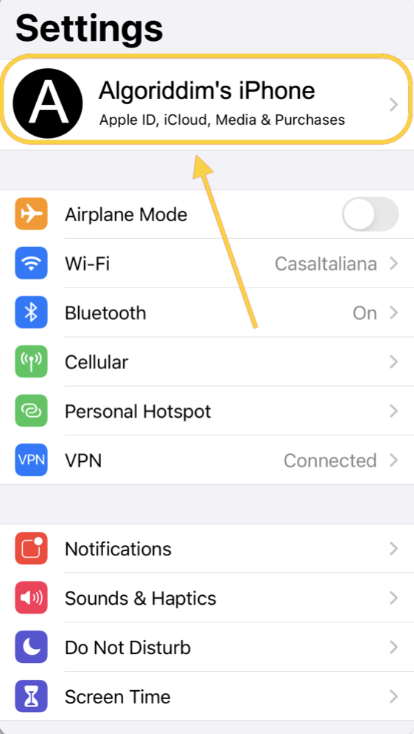
Open Settings on your iOS device.
-
Tap your Apple ID at the top of the screen.
-
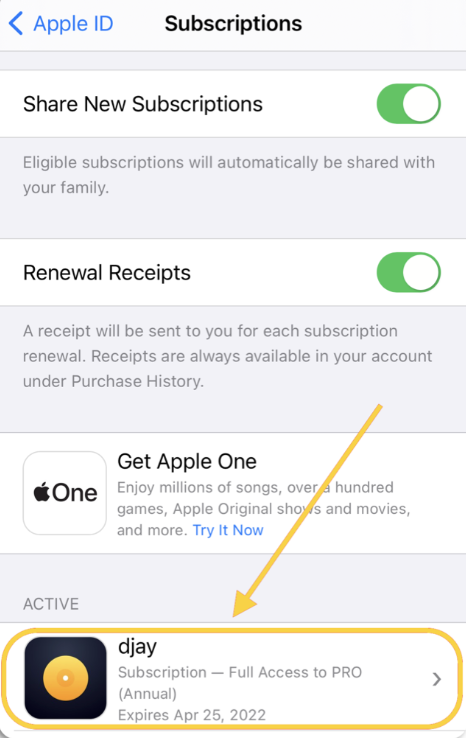
Tap Subscriptions.
-
Select the djay subscription.
-
Choose Cancel subscription or use the available options to manage your plan.
note
Note: When you cancel your subscription, you’ll continue to have full djay access until the end of your current billing period. After that, your plan will revert to the free version, and PRO features will no longer be available.